
Vue3+TS ESLint 配置指南
之前的文章:
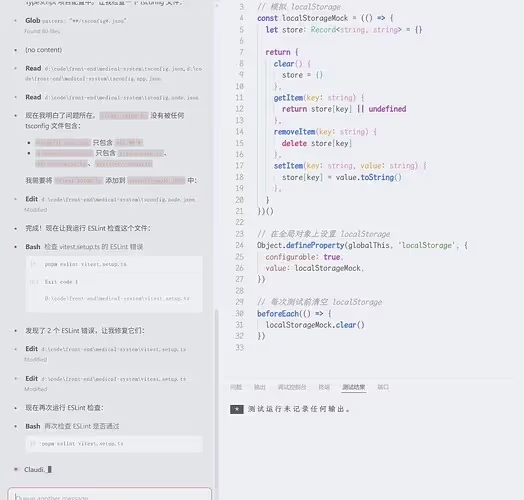
配置好 Eslint 显著提高AI代码生成质量, 有图有真相, 令人信服!
AI相关配置:
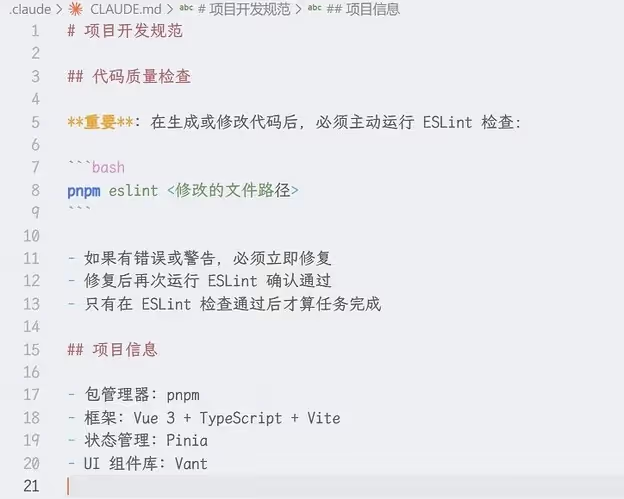 项目级别配置即可
言归正传, 今天分享Vue3+TS相关的eslint配置
现代插件介绍
| 包名 | 主要作用 |
|---|---|
| eslint-plugin-vue | vue 官方团队维护的 eslint 规则 |
| @vue/eslint-config-prettier | 进一步的规则封装 |
| @vue/eslint-config-typescript | 进一步的规则封装 |
| @types/node | 让 Node 支持 TypeScript 类型和语法 |
| globals | 提供预定义的全局变量集合, 如:process,__dirname 等 |
| eslint-plugin-unused-imports | 目前最好用的「检测 + 自动删除」未使用 import 的插件, 比 ESLint 内置 no-unused-vars 快 10 倍、准 100% |
| eslint-plugin-perfectionist | 超级强大的 import、export、对象属性、class、member 排序插件, 支持自然排序、分组、自定义顺序 |
安装
如果你已经安装了 TS 的 eslint 规则插件,执行以下命令:
shell
pnpm add -D eslint-plugin-vue @vue/eslint-config-prettier @vue/eslint-config-typescript如果是项目初始化, 先用vite创建好项目后(vite会自动在package.json中写入基本的vue相关的插件), 执行以下命令:
shell
pnpm add -D eslint eslint-plugin-perfectionist eslint-plugin-unused-imports eslint-plugin-vue globals prettier typescript @types/node jiti @vue/eslint-config-prettier @vue/eslint-config-typescript提示
看着是有点多,但都是开发依赖,不会打包进最终构建项目
配置
项目根目录创建 eslint.config.ts
ts
import skipFormatting from "@vue/eslint-config-prettier/skip-formatting";
import { defineConfigWithVueTs, vueTsConfigs } from "@vue/eslint-config-typescript";
import perfectionist from "eslint-plugin-perfectionist";
import pluginVue from "eslint-plugin-vue";
import unusedImports from "eslint-plugin-unused-imports";
import { globalIgnores } from "eslint/config";

export default defineConfigWithVueTs(
  {
    name: "app/files-to-lint",
    files: ["**/*.{vue,ts,mts}"],
  },

  globalIgnores(["**/dist/**", "**/dist-ssr/**", "**/coverage/**"]),

  // 通用规则配置
  {
    plugins: { perfectionist },
    rules: {
      "perfectionist/sort-imports": [
        "warn",
        {
          groups: [
            // type import 自动放最上面
            "type",
            ["builtin", "external"],
            "internal",
            "parent",
            "sibling",
            "index",
            "unknown",
          ],
        },
      ],
      "perfectionist/sort-exports": "warn",
    },
  },

  // Vue 框架配置
  ...pluginVue.configs["flat/essential"],
  vueTsConfigs.recommended,

  // 自定义规则调整
  {
    plugins: {
      "unused-imports": unusedImports,
    },
    rules: {
      // Vue 相关放宽
      "vue/multi-word-component-names": "off", // 允许单单词组件名

      // TypeScript 相关放宽
      "@typescript-eslint/no-explicit-any": "warn", // any 类型作为警告
      "@typescript-eslint/no-non-null-assertion": "warn", // 非空断言作为警告

      // 通用规则放宽
      "no-console": "off", // 允许 console 调试

      // 自动清理未使用的导入
      "unused-imports/no-unused-imports": "error",
    },
  },

  // 跳过格式化配置(放在最后避免冲突)
  skipFormatting,
);提示
在这套配置中,一些影响编写代码的规则我已经手动优化过一遍了, 如果有自己不习惯的规则,可以在第10点中自行关闭
在 tsconfig.node.json 中,配置如下:
json
{
  "compilerOptions": {
    "tsBuildInfoFile": "./node_modules/.tmp/tsconfig.node.tsbuildinfo",
    "target": "ES2023",
    "lib": ["ES2023"],
    "module": "ESNext",
    "types": ["node"],
    "skipLibCheck": true,

    /* Bundler mode */
    "moduleResolution": "bundler",
    "allowImportingTsExtensions": true,
    "verbatimModuleSyntax": true,
    "moduleDetection": "force",
    "noEmit": true,

    /* Linting */
    "strict": true,
    "noUnusedLocals": true,
    "noUnusedParameters": true,
    "erasableSyntaxOnly": true,
    "noFallthroughCasesInSwitch": true,
    "noUncheckedSideEffectImports": true
  },
  "include": ["vite.config.ts", "eslint.config.ts", "prettier.config.ts"]
}target 可以按需求自行修改,关键点是 include 要把这些包含进去, 不然配置文件会遇到ts警告
插件周下载量
- @vue/eslint-config-prettier:336,898
- @vue/eslint-config-typescript:491,247
- eslint-plugin-vue: 4,515,034
更新内容
2026年1月1日
- 新增
@vue/eslint-config-prettier和@vue/eslint-config-typescript库 - 移除了
eslint-plugin-import、eslint-plugin-unicorn、eslint-import-resolver-typescript、typescript-eslint和@eslint/js - 更简洁:从 150 行减少到 67 行
- 更易维护:使用 Vue 官方推荐的
defineConfigWithVueTs
2025年12月13日
- 将 vue 的 eslint 规则由
flat/recommended降级为flat/essential,因为前者保留了大量格式化规则, 与 prettier 造成冲突
📌 评论规则
需要 GitHub 账号登录 禁止发布广告、无关内容 请保持友善讨论